


Member Login| Employer Login| Donate
The Pension Boards - United Church of Christ Inc
 Sign In
  • Home
    • About Us
    • Contact Us
  • Faith & Finance
    • Corporate Social Responsibility
    • Ministerial Assistance
  • Investments
  • Giving
  • Forms
  • News & Resources

Ruth's Recipes

ruth madison
Ruth Madison serves as Executive Vice President, Benefit Plans & Services. As part of her role at PBUCC, she oversees the Customer Care team, which provides compassionate care to our PBUCC and Ministerial Assistance communities. She resides in New Jersey and enjoys baking, cooking, biking, and spending time with her two children and countless nieces, nephews, great-nieces, and great-nephews.
sweet potato casserole

Introducing Sean's Sweets: Scone Recipe

Welcome to my first edition of Sean’s Sweets! Since joining the Pension Boards, I have had the pleasure of joining Ruth Madison in serving fun treats to our staff. These scones have a crisp exterior with a soft interior and evoke a cool autumn’s day. This recipe is best served freshly-baked and with a side of your favorite scone toppings – mine is a whipped maple butter!

Ingredients

  • 360g, or 3 cups All-Purpose Flour + more for dusting/shaping.
  • 14g, or 1 tbs Baking Powder 
  • 30g, or about 2 tbs plus 1 tsp White Sugar 
  • 3g, or ½ tsp Kosher Salt 
  • 5g or about 1.5 tsp your choice of Pumpkin Spice seasoning, or ¾ tsp of Ground Cinnamon & ¼ tsp of Ground Nutmeg, Ginger, and Allspice. 
  • 57g, or 4 tbs Unsalted Butter 
  • 184g, or about 1 cup White Chocolate Chips 
  • 152g, or 2/3 cup Pumpkin Puree 
  • 170g, or ¾ cup Heavy Cream

*Optional* Cinnamon Sugar (for sprinkling on top)

  • 8g, or 2 tsp White Sugar (or, Turbinado or Demerara Sugar)
  • 3g, or 1 tsp Ground Cinnamon 

*Optional* Maple Butter

  • 1/4 cup Maple Syrup
  • 28g, 2 tbs Unsalted Butter

Scone & Cinnamon Sugar Instructions

  1. Preheat oven at 400F & set rack to the middle rack.
  2. Whisk together dry ingredients (flour, baking powder, white sugar, salt, dry spices) in a medium to large bowl. 
  3. Slice butter into small slices or cubes, toss into dry ingredient bowl. 
  4. With your hands, press butter pieces with your fingers into smaller chunks, and mix ingredients until it looks like coarse sand. 
  5. Add white chocolate chips to dry ingredients and butter bowl. 
  6. In separate bowl, mix pumpkin puree and heavy cream until uniform without chunks. 
  7. Pour wet ingredients into dry ingredients mixture. Mix ingredients until you get a consistent dough, it may look shaggy, but keep mixing! 
  8. Once the dough is uniform, dust a work surface with all-purposes and shape into an 8-inch disc. 
  9. In a third bowl (or separately dusting), mix and sprinkle white sugar and ground cinnamon on top of the scone disc. 
  10. Slice disc into 6-8 slices, and place desired number of scones onto a metal baking sheet covered with parchment paper. 
  11. Bake for 20-25 minutes until golden brown!

Maple Butter Instructions

  1. Add maple syrup to a small sauce pot or pan. Reduce until dark brown.
  2. Scrape reduced maple syrup into a heatproof bowl, add butter to bowl. 
  3. Whisk until the mixture is a consistent color and fluffy. Spread on the scones for serving!

sweet potato casserole

Sweet Potato Casserole Recipe

My family’s favorite Thanksgiving dish!

Ingredients

  • 3 cups hot mashed sweet potatoes
  • ½ cup sugar
  • ½ tsp salt
  • 2 eggs
  • ¼ cup butter
  • ½ tsp vanilla
  • ½ cup milk

Mix all the above together and put in 1 ½ quart greased casserole dish.

Topping

  • ½ cup brown sugar
  • 1/3 cup flour
  • 1 cup chopped pecans
  • 3 Tbsp butter softened

Directions

Combine the topping ingredients and sprinkle on top of the sweet potato mixture. Bake at 350 degrees for 35 minutes.

lemon blueberry cake 2

Lemon Blueberry Cake Recipe

Who doesn’t love fresh blueberries in the summer? Growing up, my aunt had a garden, and we would spend hours picking blueberries together. Now, my children have a garden— with their very own blueberry bushes! It’s a project keeping the birds (and my son’s dog!) from eating them all, but one thing I always make from those blueberries is a lemon blueberry cake. It is incredibly moist and very refreshing!

Ingredients

  • 2 ½ cups flour
  • ¾ cup canola oil
  • ¼ cup cornstarch
  • 1 ⅔ cup sugar
  • 2 tsp baking powder
  • ¼ cup of lemon juice and zest from 2 lemons
  • ¾ cup of yogurt
  • ½ tsp baking soda
  • 3 large eggs – room temperature
  • ½ tsp salt
  • 2 tbsp milk – room temperature
  • 6 tbsp butter – room temperature
  • 1 ¾ cup fresh blueberries coated in 2 tbsp flour

Cream Cheese Frosting

  • 8-ounce package cream cheese – room temperature
  • 1 stick butter - room temperature
  • 2 ½ cups confectioners’ sugar
  • Juice of ½ lemon

Directions

Grease two 8-inch round cake pans and line with parchment paper. Whisk together the first five ingredients in a bowl and set aside. In a large mixing bowl, combine the butter, oil, sugar, and lemon zest, and mix for 3 minutes. Then add eggs one at a time. Add the milk, yogurt, and lemon juice. Mix in the flour mixture by hand and then fold in the blueberries. Put mixture into prepared pans and bake for 35 – 40 minutes. Remove cake from pans after resting for about 20 minutes. While the cake is cooling, mix the ingredients for the cream cheese frosting, then frost the cake. Last, enjoy your lemon blueberry cake!

pumpkin bread 2

Pumpkin Bread Recipe

I love bread. And in the fall one of my favorite breads is pumpkin! I found this recipe many years ago and just loved how moist the bread is. It is great alone, or with a little cream cheese spread on top! I hope you love this bread as much as my family and I do. Enjoy! - Ruth

Ingredients

  • 1 15 oz can pumpkin puree
  • 4 eggs
  • 1 cup vegetable oil
  • 2/3 cup water
  • 3 cups sugar
  • 3 ½ cups flour
  • 2 tsp baking soda
  • 1 ½ tsp salt
  • 1 tsp cinnamon
  • 1 tsp nutmeg
  • ½ tsp cloves
  • ¼ tsp ginger

Directions

Mix all ingredients together until smooth. Pour into (3) greased 7 x 3 loaf pans, or one large loaf pan, and bake at 350 degrees for 40 minutes or until the tester comes out clean.
apple pie

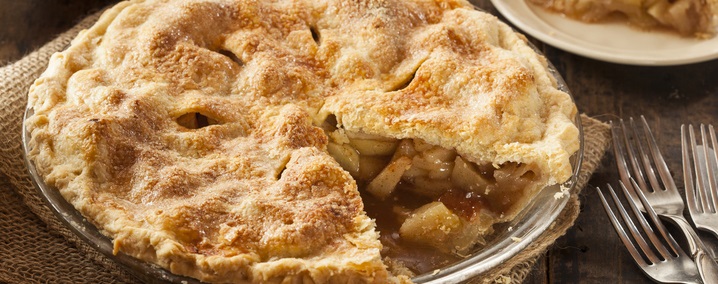
Apple Pie Recipe

There were three women named Ruth in my family, and we all shared a love of baking. One of our favorite go-to fall desserts is apple pie. Go to your local orchard or farm stand and buy some of your favorite apples and mix them up in this pie recipe. We used to pick apples right from my cousin’s apple orchard.

Ingredients

  • 1 basic pie crust recipe or store-bought crust
  • 8 cups of sliced apples
  • 2/3 cup of sugar
  • 3 tbsp flour
  • 1- 1 ½ tsp cinnamon
  • ¼ tsp nutmeg
Mix the above ingredients together and stir into the apples, then set aside.

Toppings

  • 1 cup oatmeal
  • 1 cup flour
  • ¾ cup brown sugar
  • 1 cup chopped nuts (walnuts or pecans)
Mix the above ingredients together. Add in a ½ cup of butter and mix until the mixture is crumbly.

Directions

Pour apples into pie shell, put on topping, and bake at 350 degrees for at least 50 minutes until the juices from the apples start to bubble and thicken.

For a healthier version, serve the apple pie with a slice of cheddar cheese instead of ice cream. As my mom would say, “Apple pie without cheese is like a kiss without a squeeze!”

PBUCC Plan Transition FAQs

A publication of the below FAQs is available here.

Recordkeeping services for the PBUCC Lifetime Retirement Income Plan for the United Church of Christ (the “Plan,” formerly known as the Annuity Plan for the United Church of Christ) will move to Fidelity Investments effective September 1, 2023. Until now, the Pension Boards has handled recordkeeping for those in the accumulation (i.e., pre-annuitized) phase internally. Your account will be transferred to Fidelity with no action required from you; you will not need to re-enroll in the Plan.

A recordkeeping service tracks and reports on your retirement Plan assets, account balance, Plan contributions, investment mix, and investment performance.  In addition, Fidelity provides a variety of financial planning tools and resources.

Annuities have gotten a great deal of bad press for their frequently high sales commissions fee structures. Lifetime Retirement Income both accurately describes our plan and avoids negative connotations that do not apply to us.

Transitioning recordkeeping services to Fidelity will result in greater efficiency, long-term cost savings, and even more support for our members’ financial goals, today and in retirement.

Founded in 1946, Fidelity has always been committed to accuracy, top technologies, and the highest ethical standards. Fidelity serves more than 37 million customers1 and brings that experience to help you manage your financial priorities at every stage of your life. Because their services are utilized by thousands of tax-exempt organizations, including faith-based organizations, the Pension Boards believes they understand how to assist our Members in making the most of the Pension Boards’ Lifetime Retirement Income Plan.
1Fidelity Corporate Finance as of 12/31/2021.

You will have access to:
  • The Fidelity NetBenefits® website and mobile app to easily access and manage your account at home or on the go.
  • One-on-one consultations with a licensed Fidelity Retirement Planners who can help you plan for your financial goals and discuss your investments.  
  • On-demand online financial planning tools and resources.     
  • Periodic live webinars to help you improve your financial wellness.    
  • Extended customer service hours (8:30 a.m. to 12:00 a.m. EDT, Mon-Fri) through Fidelity to discuss your plan assets and financial goals.  

These features and benefits will be available to those in the accumulating phase and to annuitants at no additional cost.
E&Y Financial Consultants and E&Y Navigate will be available to Pension Boards Members until September 1. You may begin work with a licensed Fidelity Retirement Planner at that time.

No. Investment options remain the same with a lineup of funds that seek to maximize returns while adhering to the values of the United Church of Christ.

No, Fidelity will only provide recordkeeping services, they will not attempt to sell their retail services to PBUCC Members as a result of this change.

No, there will be no impact. Current management practices and payments will continue as usual.

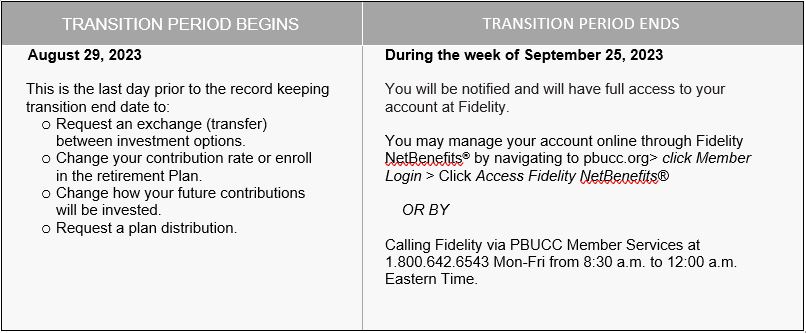
There will be a short transition period when you will not be able to make changes to your account while it’s being transitioned to Fidelity.*

PLEASE NOTE: August 29 is the last day to check your market account balance. If you are concerned about market volatility during the transition period, you can make changes prior to that date at PBUCC.ORG > Member Login > View My Pension and Other Benefits > Take Action > Reallocate My Account Balance. You can also contact PBUCC Member Services at 800-642-6543 from 8:30 a.m. to 4:30 p.m. ET, Mon-Fri.

Fidelity FAQ AnswerTable
*The timing of the plan changes and transition period, including any asset reallocations, described within the Transition Guide depends on a variety of factors, which may include: the timing and accuracy of the transfer of data, receipt of instructions, and receipt of assets. Changes in any of these factors may result in changes to the timing of the delivery of services, the transition period, and/or the dates on which, and thus the prices at which, assets in your account are sold and/or reinvested.

There are multiple ways you can access your account after the transition period:
  • Online: When the transition is complete in September, you can access your account via PBUCC.ORG > Member Login > Access Fidelity NetBenefits®.
  • Mobile App: Download the Fidelity NetBenefits® app through your Android or Apple app stores to access your account securely on your mobile devices anywhere, anytime.  
  • Phone: You can also call the Fidelity Retirement Service Center through PBUCC Member Services at 800-642-6543 from 8:30 a.m. to 12:00 a.m. ET, Mon-Fri.
Note: If this is your first time creating a NetBenefits® account, you will need to establish a user ID and password. If you have an existing NetBenefits® account, you will not be asked to re-register but may be asked to confirm your identity.

PBUCC Account Statements: Your last statement that you will receive from the Pension Boards will be available mid-September and will include July 1 through September 5 activity.  Starting in October 2023, you will receive your account statements directly from Fidelity. 

Account Statements on Fidelity: Your first statement from Fidelity will be available in October 2023 on NetBenefits® by navigating to pubcc.org > Member Login > Click Access Fidelity NetBenefits® > Click on the Vertical Dots Icon > Statements. The first statement will reflect activity from September 6 through September 30.

Account statements will not be automatically mailed to your home. To change your mail preferences and request that statements be mailed to your home address, call Fidelity through PBUCC Member Services at 800-642-6543 from 8:30 a.m. to 12:00 a.m. ET, Mon-Fri. You can also log on to NetBenefits® > Select Profile > Communications.

Beneficiary elections for the Lifetime Retirement Income Plan (Employer and Employee Contributions) will not transfer to Fidelity. It is important for you to designate your beneficiaries through Fidelity when the transition is complete. To update your beneficiary designations on Fidelity, go to: PBUCC.ORG > Member Account > Access Fidelity NetBenefits® > Profile > Beneficiaries.

You can also contact Fidelity for a form to complete and return to Fidelity. Contact Fidelity through PBUCC Member Services at 800-642-6543 from 8:30 a.m. to 12:00 a.m. ET, Mon-Fri.

Please note that beneficiary designations for the Pension Boards Life Insurance and Disability Income plan are not impacted by the change in record keeping services.

There is no impact if you wish to start collecting your Lifetime Retirement Income payments during or after the transition. If you have questions on the process to begin your retirement, contact a PBUCC Pension Counselor at 800-642-6543 from 8:30 a.m. to 4:30 p.m. ET, Mon-Fri.

Yes, webinars will be available both before and after the transition. To register and learn more, visit http://www.myfidelitysite.com/pbucc, click on Informational Workshops.

Fidelity and PBUCC will host "Get Ready for the Move to Fidelity" webinars in August. Attend a session to learn more about the transition and get answers to your questions. In addition, there will be a pre-recorded “Get Ready” session that will be available on-demand.

We will also have "Ask Fidelity" sessions where you can join at any time to ask a question and then either stay to see what others are asking or log off. There is no formal presentation during these sessions. Fidelity will address questions about the transition and Fidelity services in general, but not personal account information.

When the transition is complete, Fidelity will present "Get to Know Fidelity" webinars to introduce you to the Fidelity NetBenefits® website and some of the services Fidelity offers. In addition, there will be a pre-recorded “Get to Know Fidelity” session that will be available on demand.

Call Pension Boards Member Services at 800-642-6543 from 8:30 a.m. to 12:00 a.m., Mon-Fri. Depending on your need you will be quickly routed to either a Pension Boards Customer Service Representative or to the Fidelity Retirement Service Center.

Yes. In addition to PBUCC’s Spanish-speaking representatives, you will have access to Fidelity’s Spanish-speaking representatives by calling the Pension Boards Member Services at 800-642-6543 from 8:30 a.m. to 8:30 p.m., Mon-Fri and you will be directed to the appropriate representative.

In addition, you will have access to Fidelity’s Spanish-speaking Retirement Planners by calling Pension Boards Member Services at 800-642-6543 from 8:30 a.m. to 9:00 p.m., Mon-Fri.

Also, the Fidelity NetBenefits® mobile app is available in Spanish, and Fidelity will present Spanish-language financial wellness webinars.

Your TSA contribution rates can be changed on Fidelity NetBenfits® after the transition period concludes. Your elections will be provided to your employer and will be effective typically in 1 to 2 pay periods.
  • Online: Go to PBUCC.ORG > Member Login > Access Fidelity NetBenefits® > Click on the Vertical Dots Icon > Contribution Amount.
  • Phone: You can also call Fidelity via PBUCC Member Services at 800-642-6543 from 8:30 a.m. to 12:00 a.m., Mon-Fri.

When the transition period is complete, you can make changes to your investment allocation through the NetBenefits® website or mobile app. You can also call Fidelity via PBUCC Member Services at 800-642-6543 8:30.a.m. to 12:00 a.m. ET, Mon-Fri.

After the transition of recordkeeping services to Fidelity, you can transact the investments in your PBUCC retirement account any day, excluding market holidays. Your transaction will be effective at the close of the market (4:00 p.m. ET) following your request.  For example:
  • Transaction requested Monday, October 2, at 11:00 a.m. ET:   Effective 4 p.m. ET on October 2
  • Transaction requested Monday, October 2, at 6:00 p.m. ET:    Effective 4 p.m. ET on October 3
  • Transaction requested Friday, October 6, at 6:00 p.m. ET:   Effective 4 p.m. ET on October 9.
NOTE: While daily transactions are available, transacting with excessive frequency might hurt your long-term performance.  Therefore, we recommend working with your personal financial advisor to discuss what investment decisions are right for your situation. In addition, you can contact a licensed Fidelity Retirement Planner at 800-642-6543 from 8:30 a.m. to 9:00 p.m., Mon-Fri.  

As part of the transition to Fidelity, annual RMD payments will be processed by Fidelity. Starting in November 2023, Fidelity will begin issuing payments to PBUCC members. Please expect a notice from Fidelity regarding your RMD.

Fidelity will process the RMD as follows:
  • Federal withholding: Unless you contact Fidelity, they will withhold Federal tax based on the IRS wage withholding instructions. and withhold Federal tax as if you are single with no adjustments, as a default.
  • State withholding: Fidelity will withhold State tax in any states that have mandatory withholding, and Fidelity can also withhold State tax for optional states based on a request received from you to Fidelity.
  • Any changes to your tax withholdings can be performed directly on NetBenefits®.
  • Payments will be made via a check unless you set up an Electronic Fund Transfer (EFT) in NetBenefits®.
After the Fidelity transition period ends (late September), you can visit www.pbucc.org, sign-in to your account, and click Access Fidelity NetBenefits® to set up your NetBenefits® username and password for transaction security, plus more. You may also call Fidelity through PBUCC Member Services at 1.800.642.6543 for additional assistance.

For PBUCC Members with accumulating accounts, Fidelity will distribute 1099Rs for tax years 2023 forward.  Northern Trust will continue to provide 1099Rs for annuitized PBUCC Members.

Excluding your Lifetime Retirement Income Payments (which will continue to be handled by Northern Trust), Fidelity will handle all distributions and transfers after the transition. You can initiate a transfer or distribution from your accumulation account online or by phone.

Online: go to PBUCC.ORG > Member Login > “Access Fidelity NetBenefits® > Click on the Vertical Dots Icon > Loans or Withdrawals.

By Phone: Call PBUCC Member Services at 800-642-6543 from 8:30 a.m. to 12:00 a.m. ET, Mon-Fri.

Your account balance will be updated daily based on the previous market close.

“Valued as a Fresh Pair of Eyes”

By Intern Epiphany Larmey

784A2950

I applied to PBUCC’s Summer Internship Program not knowing what to expect. I didn't know much about Pension Boards, and I wasn't too familiar with the United Church of Christ. But what I knew from the first interview was that PBUCC attracted people who I wanted to learn from, and I wasn't wrong. There are few companies who treat interns as well as PBUCC, and who truly recognize the value that each mind brings to the workplace. I was able to grow in my knowledge and confidence because of the confidence and care that was entrusted to me in the office. PBUCC really cares about being better, reaching people better, and adhering to a mission of love, which really came across in the workplace between colleagues and interns. I enjoyed getting to know everyone here— the interns in my cohort, the leaders who managed me, and the leaders who managed my managers. I am thankful for my time at PBUCC and the relationships and confidence this company has given me.

Read more …

“They Molded Us Into Professional Consultants”

By Intern Nayana Mahajan

 MG 3121 1

My journey in PBUCC has been incredible. In the first few weeks, we were acquainted with the leaders from each organizational unit which gave us high-level insights. I interned in the Information Technology department working with Michele and Tom's team. They gave me an enthusiastic welcome, and assigned me tasks to resolve business issues. I got to use my skills in Python programming and Power BI analytics.

Read more …

Newfound Confidence

By Intern Nandini Kolli

 MG 3026 1

When I applied to the Pension Boards Summer Internship Program, I did not have many expectations. But after joining the internship everything changed. The Pension Boards is an organization that believes in “doing good” for mankind. They believe in faith and finance.

Read more …

Diversity — Different Fields Bring Unique Perspectives

By Intern Partha Adhikari

 MG 2997 1

My internship at PBUCC was quite an exciting journey. During the initial interview phase, I got to speak with Walter and Nakita (Human Resources), and interacting with them gave me a feeling of what the company culture would be like, and I was not mistaken. PBUCC has a very welcoming environment where everyone is quite approachable and that makes learning very interactive and exciting. The second round of interviews introduced me to my team and that helped me further understand what was expected from me during the course of the internship, and what opportunities I would be given to further develop my skill sets.

Read more …

An Enriching Experience

By Intern Jonathan Ahn

 MG 2992

My summer internship at PBUCC has been an enriching experience. The Human Resources team made the internship memorable with several engaging events for the interns to get to know each other better, including a Meet and Greet, Sip and Paint, various pop-up challenges, and a BBQ at Morningside Park, N.Y.

Read more …

“PBUCC Raised My Standards for Company Culture”

By Intern Alice Zhang

 MG 3064 1

I am truly grateful for the financial planning internship opportunity at PBUCC. Coming in as a rising junior/senior from New York University, this 10--week experience brought me closer to discovering my purpose and career before graduation.

Read more …

“A Well-Rounded and Fun Summer Internship Experience”

By Intern Sambodhi Vasani

 MG 3079 1

I was lucky enough to have the opportunity to work as a Finance and Accounting Summer intern for the Pension Boards-United Church of Christ (PBUCC). During my interview process, I got the impression that PBUCC had an open and welcoming work environment. The time that I have spent here has only further confirmed my initial impression. PBUCC not only has a welcoming work environment, but it is a place where everyone’s views are considered. PBUCC also emphasizes a collaborative workspace.

Read more …

“I Would Rate PBUCC 10/10”

By Intern Patience Akariza

784A2941 2

I am incredibly thankful to have had the chance to intern for the Pension Boards-United Church of Christ (PBUCC) in the Generations Analytics department. My experience has been a rich one from the moment I first opened the Pension Boards’ doors—from trying to take everything in, remembering people’s names and their roles—to being able to call the people here my friends. I enjoyed giving a different answer every time someone asked me “What do you do?” because I got to work on a wide range of tasks and projects every week.

Read more …

Toll-Free: 1.800.642.6543

Fax: 212.729.2701

Email: [email protected] 

475 Riverside Drive

Room 1020

New York, NY 10115

MOST POPULAR

  • Rate Locator
  • The Christmas Fund
  • UCC Medical Benefits Plan
  • Disability Plan Facts
  • Flexible Benefit Plan for UCC Ministries
  • Medical Forms
  • Promotional Resources
  • Employee Pre-Tax Contributions into the UCC Lifetime Retirement Income Plan

ABOUT US

  • Board of Trustees
  • Executive Staff
  • Privacy Policies
  • Website Accessibility
  • Technology Resources
  • Career Opportunities
  • Contact Us
  • Internships

FOLLOW US

  • Facebook: 508237685873649
  • Twitter: PensionBoards
  • YouTube: PBUCC2010
  •  


Copyright©  The Pension Boards-United Church of Christ, Inc.
475 Riverside Drive, Room 1020, New York, NY 10115  •  Phone: 800.642.6543  •  Fax: 212.729.2701 •  E-mail: [email protected]